Terminal UI
The terminal UI is an optional front end of the jupedsim-network
command. It edits a scenario file in forms, then runs the command’s own
check and run. Check shows the text that
jupedsim-network check FILE prints. Run is
jupedsim-network run FILE -o DIR: the same five files and the same
lines, plus progress and cancel. You write no Python.
The UI adds no numbers, no defaults and no checks of its own. Every field is a key of the scenario file, an empty field takes the API default, and every error message is the loader’s.
Install
Python 3.10 or later:
pip install "jupedsim-network[tui]"The tui extra adds textual (8.2 or later). The core install stays
NumPy-only: run, check, init and --help never import textual.
Without the extra, jupedsim-network tui ends with exit status 1 and
this message:
jupedsim-network tui: error: the terminal UI needs the tui extra (missing module 'textual'). Install it with: pip install "jupedsim-network[tui]"
Start
jupedsim-network tui scenario.jsonThe usage line of jupedsim-network tui --help is
usage: jupedsim-network tui [SCENARIO.json] [--theme NAME]. With a file, the UI opens it on the Edit step. Without one, it starts on
the Scenario step. python -m jupedsim_network tui is the same command.
A file that is not valid cannot be opened. The loader’s error is shown
under the path box, in the words of the command line, for example
typo.json: simulation: unknown key 'max_densty'; valid keys: .... Fix
the file in an editor, guided by jupedsim-network check
(Errors).
Opening an invalid file for repair is planned after version 1.0
(issue #47).
Check: the step bar at the top reads
1 Scenario › 2 Edit › 3 Check › 4 Run › 5 Results. Below 100 columns
it shows the numbers only.
The five steps
1. Scenario
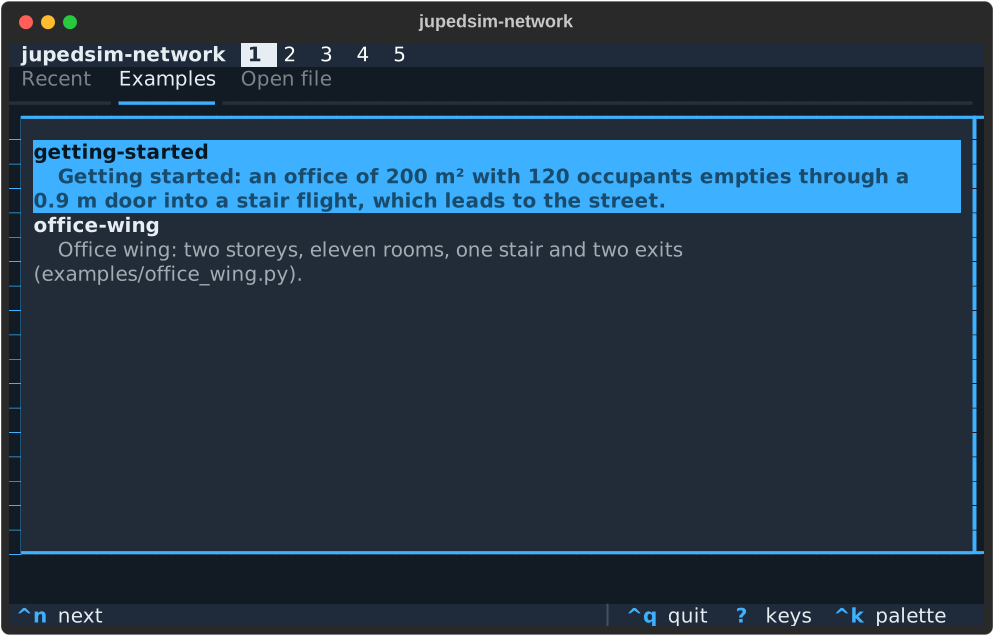
Three tabs:
- Recent: the files you opened before.
- Examples:
getting-startedandoffice-wing, the two files ofjupedsim-network init --example. An example opens unsaved asuntitled (NAME). The first save asks for a path. An unchanged example, once saved, is byte for byte the file thatinitwrites. - Open file: a path box. Tab completes it and lists folders and
.jsonfiles.
Tab to the tab row and use ←/→ to switch tabs; Enter opens the selected file or example.
2. Edit
![The Edit step at 120 by 35 characters: the Connections tab with the list of connections on the left and the form of connection 0 on the right; its width field holds abc, is marked invalid, and the status line shows the error connections[0].width: expected a number, got the string “abc”](/jupedsim-network/images/tui/edit-error.svg)
The tabs are Nodes · Connections · Populations · Settings. Each list tab pairs the elements, in file order, with a form for the selected one. A marker next to each field shows its state:
| Marker | Meaning |
|---|---|
default | The key is absent; the API default applies. |
set | The file sets the key. |
✗ invalid | The loader rejects the value. |
required | The key must be set. |
not set | Room area, length and width: none of them is set yet. |
The help of a field comes from the API docstrings. It appears when the field has focus, and it names the unit.
These rules decide what reaches the file:
- An empty text box removes the key, so the API default applies.
- Backspace on a switch or a choice resets it to the default.
- The UI never fills in a value.
- Text that is not a number is passed on as text. The loader’s
message then appears, for example
connections[0].width: expected a number, got the string "abc". - Order matters. Nodes, connections and populations are created in
file order, and
alt+↑/↓changes that order (Watch for these).
The scenario is checked on every edit. The UI shows one error at a time, the first one the loader finds, next to its field; an error about the whole element is shown above its form. Enter on the status line moves to that field.
Renaming a node offers to rename its references as well
(Also rename 'office' in ...?). Changing the kind of a node keeps its
riser and tread in memory.
Distributions in the form
count, speed, pre_movement and start_distance take a number or
one of Fixed, Uniform, Normal, LogNormal, Triangular and
Weibull with its fields
(Distributions).
lower and upper are text fields under the same rule as every field:
- empty takes the default (
lower0,uppernone); - a number sets the bound;
nullwrites"lower": null, which removes the bound.
The form has no separate “none” choice and shows no sampled preview.
3. Check
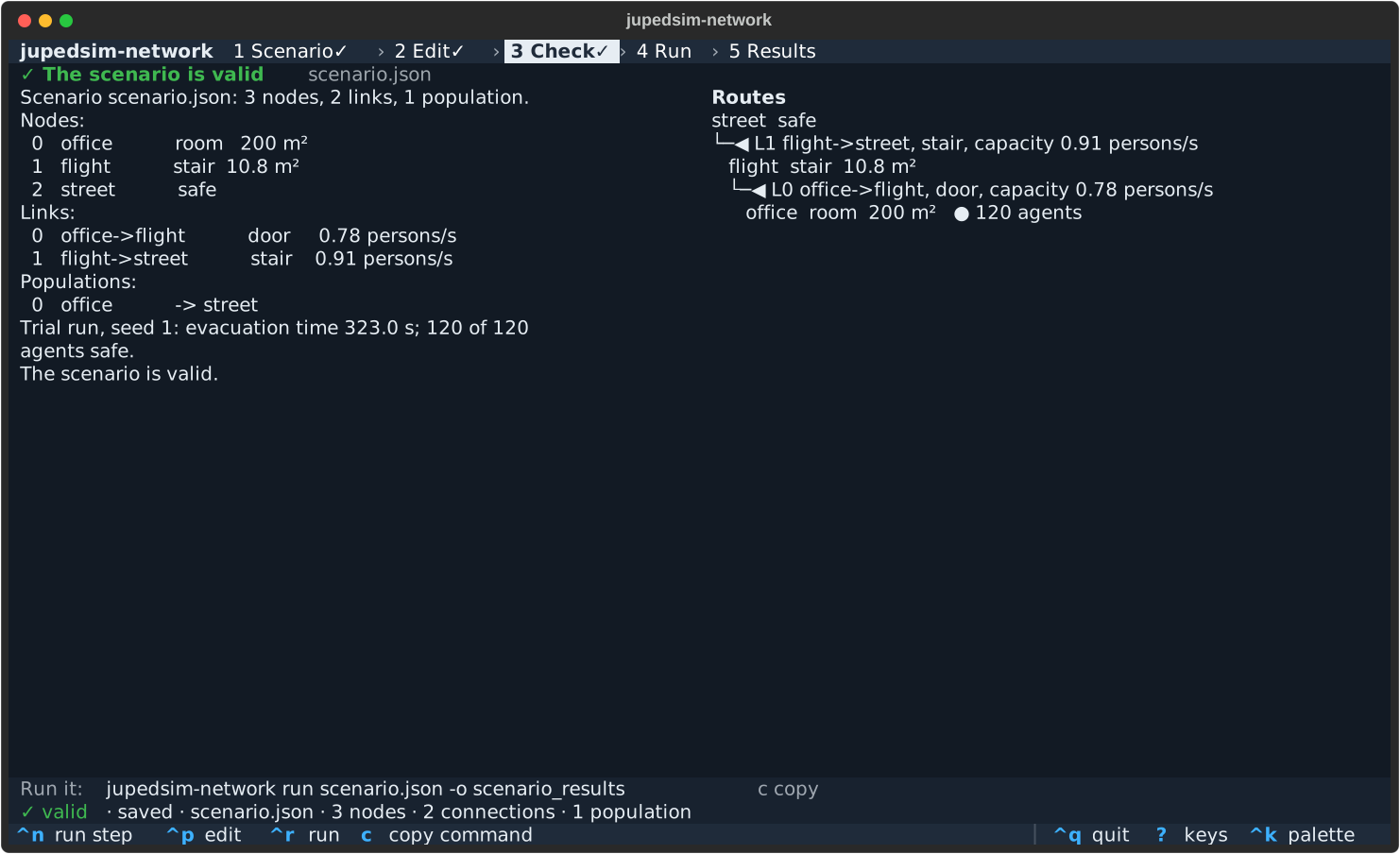
Check saves the file first and asks (Save scenario.json and check?),
so the screen shows what check FILE prints for the file on disk. The
left pane holds the stdout and stderr of jupedsim-network check FILE,
line for line, including the trial run with run.seed
(First run).
The right pane is the route tree. Each safe node is a root. Each link
has its own line, with its kind and capacity in persons/s, above the
node that leaves by it; a node line shows its kind and area, and a
start node also its agents (● 120 agents).
- Tied links read
ties: split between ...whensplit_tiesis on, the default. - Links on no route are listed as
not on a route: ....
The tree comes from Network.route_table and Network.route_choices
(Routes). Below the
panes is the equivalent command; c copies it.
check makes one trial run with one seed. “Valid” means the file is
well formed and the API accepts it; it says nothing about whether the
model is valid for your building
(Command line).
4. Run
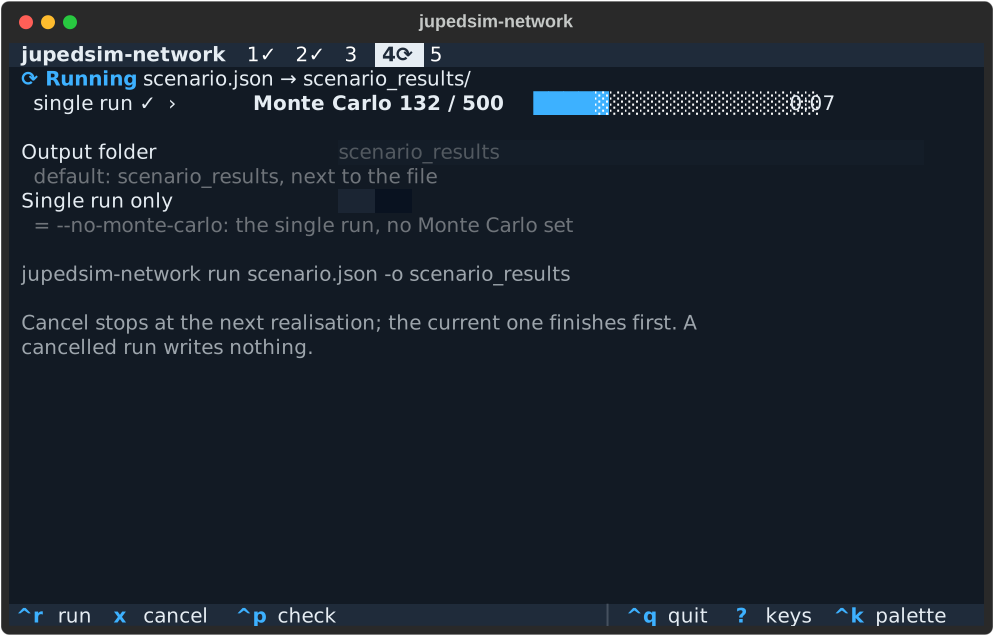
ctrl+r saves unsaved changes first, with the same question, and
starts the run.
- Output folder: by default
<stem>_resultsnext to the file. - Single run only is
--no-monte-carlo. - If the folder already holds a
summary.json, the UI asksDIR/ holds results; replace them?. The command line replaces them without asking. The files written are the same.
The run goes through the phases single run › Monte Carlo n / N ›
writing. The progress bar counts the realisations of the Monte Carlo set
(run_many(progress=),
Running).
The run uses a frozen copy of the saved file. Edits made during the run do not reach it.
5. Results
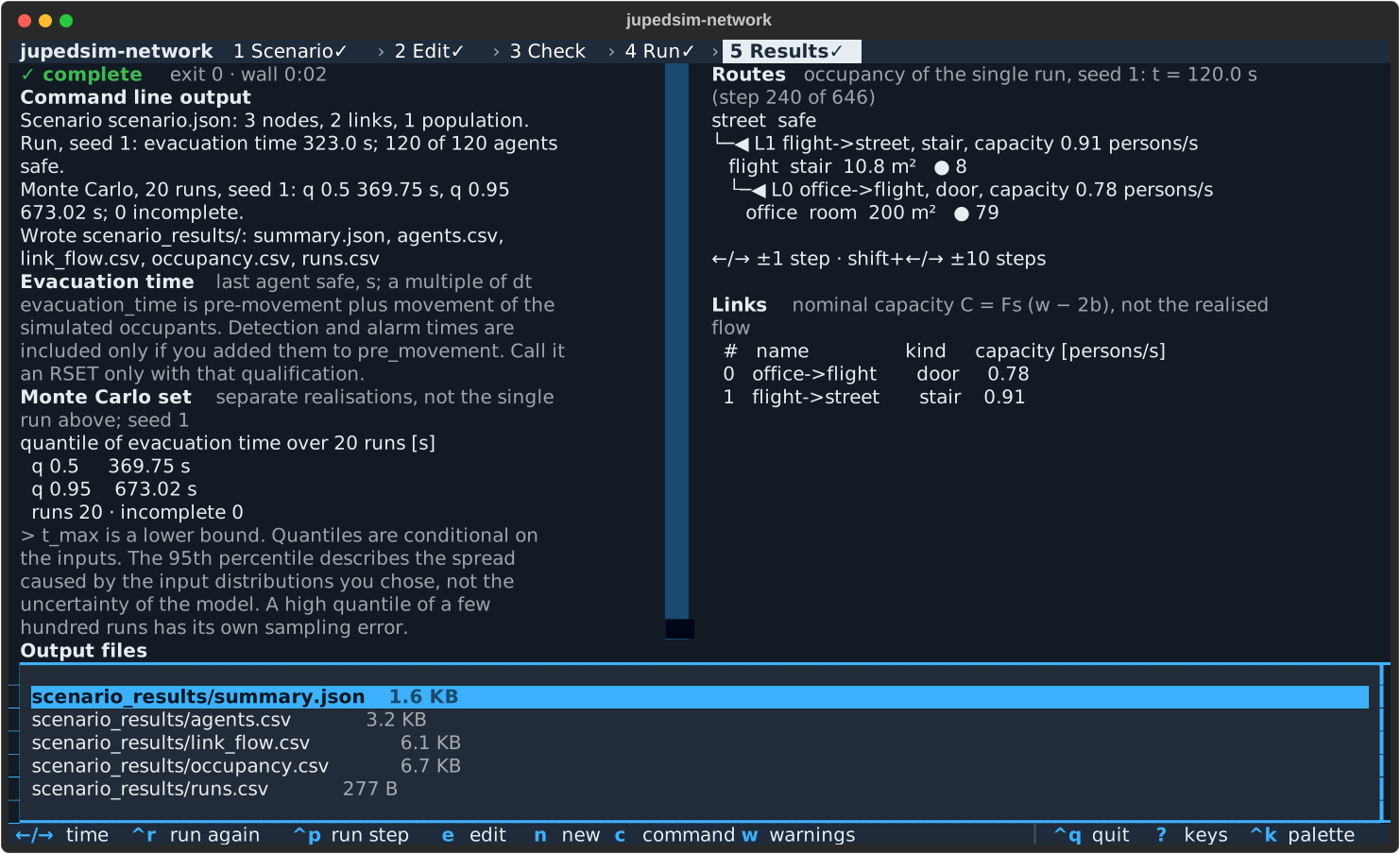
From top to bottom:
The outcome, with a glyph and the exit status of the command line:
Glyph Outcome Exit status ✓ complete 0 ◐ incomplete: agents were left at t_max; the results are written2 ✗ error; nothing was written 1 ■ cancelled Command line output: the stdout lines of
run, unchanged.! n warnings w list: thewarning:lines of the command line, which are thewarningsofsummary.json.wlists them.The evacuation time note.
The Monte Carlo block: the quantiles of the evacuation time over the runs, then
runs · incomplete.The route tree with occupancy: the agents in each node in the single run at time t.
←/→moves one step,shift+←/→ten steps.Links: the capacity of each link in persons/s.
Output files: Enter previews a file; there
ycopies its path andoopens it.
After an edit, a banner reads ✎ Settings changed since this run.
What the screen says
These lines appear on the Results step. They state what each number means.
Evacuation time last agent safe, s; a multiple of dt, followed by: “evacuation_time is pre-movement plus movement of the simulated occupants. Detection and alarm times are included only if you added them to pre_movement. Call it an RSET only with that qualification.”Monte Carlo set separate realisations, not the single run above; seed N. The single run usesrun.seed; realisation i of the set uses child i ofSeedSequence(monte_carlo.seed).spawn(runs). The single run is not one of the set (First run).quantile of evacuation time over N runs [s]: a quantile, over the runs, of the evacuation time of each run, with NumPy’s default linear interpolation.q 0.95is not the time by which 95 % of the agents are out.> t_max is a lower bound.A quantile that depends on unfinished runs is only known to exceedt_max. The note goes on: “Quantiles are conditional on the inputs. The 95th percentile describes the spread caused by the input distributions you chose, not the uncertainty of the model. A high quantile of a few hundred runs has its own sampling error.”Links nominal capacity C = Fs (w − 2b), not the realised flow. The value includes neither supply reduction nor counterflow sharing. The two links of a two-way connection each show $C$ but share one door under"bounding"and"estimate"(Counterflow).occupancy of the single run, seed N: t = T s (step i of n). These are heads, not weighted byarea_factor, and safe nodes are left out (Limitations). A Monte Carlo set records no time series, so occupancy always belongs to the single run.
Results and the result files
Every number on Results is read from what run prints or writes
(Result files):
| On screen | From |
|---|---|
| Command line output | the stdout of run |
| Quantiles, runs, incomplete | monte_carlo in summary.json |
| Links and capacity | links in summary.json, rounded to 0.01 as check prints it |
| Warnings | warnings in summary.json |
| Occupancy | occupancy.csv |
The result files are those that jupedsim-network run FILE -o DIR
writes for the same file, byte for byte when FILE is the same path
string. summary.json stores the scenario path as given.
Cancel
x or ctrl+c asks first. The current realisation then finishes and
the run stops.
- A cancelled run writes nothing. The output folder stays as it was, earlier results included. The finished realisations are discarded, so no partial quantiles are ever shown.
- A cancel confirmed at any time after
ctrl+r, even before the run has started, holds. It never carries over to a later run. - Writing the files cannot be cancelled.
- Quitting during a run asks, cancels and waits for the current realisation.
The outcome line then reads one of:
■ Cancelled after k of N runs; nothing was written.
■ Cancelled during the single run; nothing was written.
■ Cancelled before it started; nothing was written.
On the command line, Ctrl-C ends with exit status 130 (Exit status).
Keys
? or F1 shows this list in the UI.
| Key | Action |
|---|---|
Tab / Shift+Tab | next / previous control |
↑ / ↓ | previous / next field of a form |
[ / ] | previous / next tab (Edit) |
a, d, alt+↑/↓ | add, delete, move an element (Edit list) |
backspace | on a switch or choice: back to the default (an empty text box also removes the key) |
Enter | on the status line or an error: go to the field |
ctrl+n / ctrl+p | next / previous step (Esc also goes back) |
ctrl+s | save (asks for a path the first time) |
ctrl+r | run (saves first, asks) |
c | copy the jupedsim-network run command |
x or ctrl+c | cancel a run |
←/→, shift+←/→ | Results: occupancy time ±1 / ±10 steps |
w, y, t | Results: warnings, copy path, traceback |
o | file preview: open in the default app, if available |
e, n | Results: edit, new scenario |
? or F1 | this list; on a field, its help first |
ctrl+k | command palette (themes, steps, save as) |
ctrl+q | quit (asks with unsaved changes or during a run) |
t shows the traceback on Results after an internal error.
Themes and colour
Two themes: network-dark, the default, and solarized-light. The UI
takes the first of:
--theme NAME;- the variable
JUPEDSIM_NETWORK_TUI_THEME; - the theme you used last;
network-dark.
An unknown name ends the command with exit status 1. An unknown
--theme prints the error after the usage line:
jupedsim-network tui: error: JUPEDSIM_NETWORK_TUI_THEME='x' is not a theme; choose from network-dark, solarized-light
jupedsim-network tui: error: argument --theme: invalid choice: 'x' (choose from 'network-dark', 'solarized-light')
With NO_COLOR set, the UI is monochrome. Colour is never the only
signal: every state has a glyph and a word.
Terminal size
The UI needs at least 80×24 characters. In a smaller terminal, the
notice Terminal is W×H; the TUI needs 80×24. appears over the screen; a
running run continues. From 120×35, the list and the form, and the
panes of Results, sit side by side. At 80×24, reach the route tree and
the links on Results with shift+Tab or PageDown.
Recent files
The list of recent files is stored in
$XDG_CONFIG_HOME/jupedsim-network/recent.json, or in
~/.config/jupedsim-network/recent.json when XDG_CONFIG_HOME is unset
or empty. This holds on every platform, macOS and Windows included. The
file keeps at most 10 files, each with its path, date and last run
status, and the last theme. If it cannot be read or written, the UI
works without it. Delete it to clear the list.
Limits
- One error at a time.
- An invalid file can be neither opened nor saved
(
Cannot save: <path>: <message>). - A cancel waits for the current realisation.
- A single run, without Monte Carlo, shows no progress and cannot be cancelled while it runs.
- The terminal must be at least 80×24.
- Distributions have no sampled preview.
- Results shows no per-link counts, peak flows or exit-time statistics, because the command line does not produce them.
Opening an invalid file for repair, a sampled preview and per-link statistics on Results are planned after version 1.0 (issue #47).
The model is verified, not validated. Read Limitations before you use a result.
Next steps
- Command line: the scenario file, the result files and the exit status.
- Networks and Populations: what each field of the forms means, with its default.
- Results: how to report the evacuation time and the quantiles.